When I debug Gemini CLI, I treat the route as one variable inside a longer chain that also includes auth mode, local credential residue, workspace hygiene, and upstream account separation.
Recommendation: I use proxies on Gemini CLI only when they answer a narrow QA question: session stability, route separation, regional observation, or cleaner troubleshooting. I do not use them to imply entitlement, billing success, or policy bypass.
June 2026 AI access-layer evidence update
I now separate AI proxy recommendations into two layers: route control for accounts, CLIs, and gateways, and data-access tooling for browser agents or public-web retrieval. That keeps the recommendation from overselling raw IP rotation.
Bright Data is strongest when the workflow may need proxies plus Web Unlocker, SERP API, Browser API, Web Scraper API, or MCP access in one stack. The 2026-07-01 console capture showed the product surface as proxies, web access APIs, scrapers, datasets, and AI gateways rather than a proxy-only storefront.
Apify is the better comparison when the buyer wants a runnable Actor or MCP-connected automation flow. Its Store evidence captured on 2026-07-01 showed high-adoption actors such as compass/crawler-google-places near 486K users, apify/instagram-scraper around 314K users, and apify/google-search-scraper around 145K users.
For CLI and API gateway work, I would use Bright Data-style routing when session stability, country QA, or managed unblocking matters. I would use Apify when the task is really a scraper/automation job that should return structured output instead of only changing egress IP.
| Layer | What the evidence supports | Best fit |
|---|---|---|
| Raw proxy route | Sticky residential, ISP, or datacenter | Account QA, CLI auth stability, gateway admin checks, and regional observation. |
| Managed access layer | Web Unlocker, SERP API, Browser API, MCP, or Actor | Agent browsing, search retrieval, structured extraction, and data collection where raw proxies are not enough. |
Evidence note: Figures above come from logged-in or API-captured Bright Data and Apify evidence dated 2026-07-01. No API tokens, account IDs, billing records, or private screenshots are published here.
Current official baseline I start from
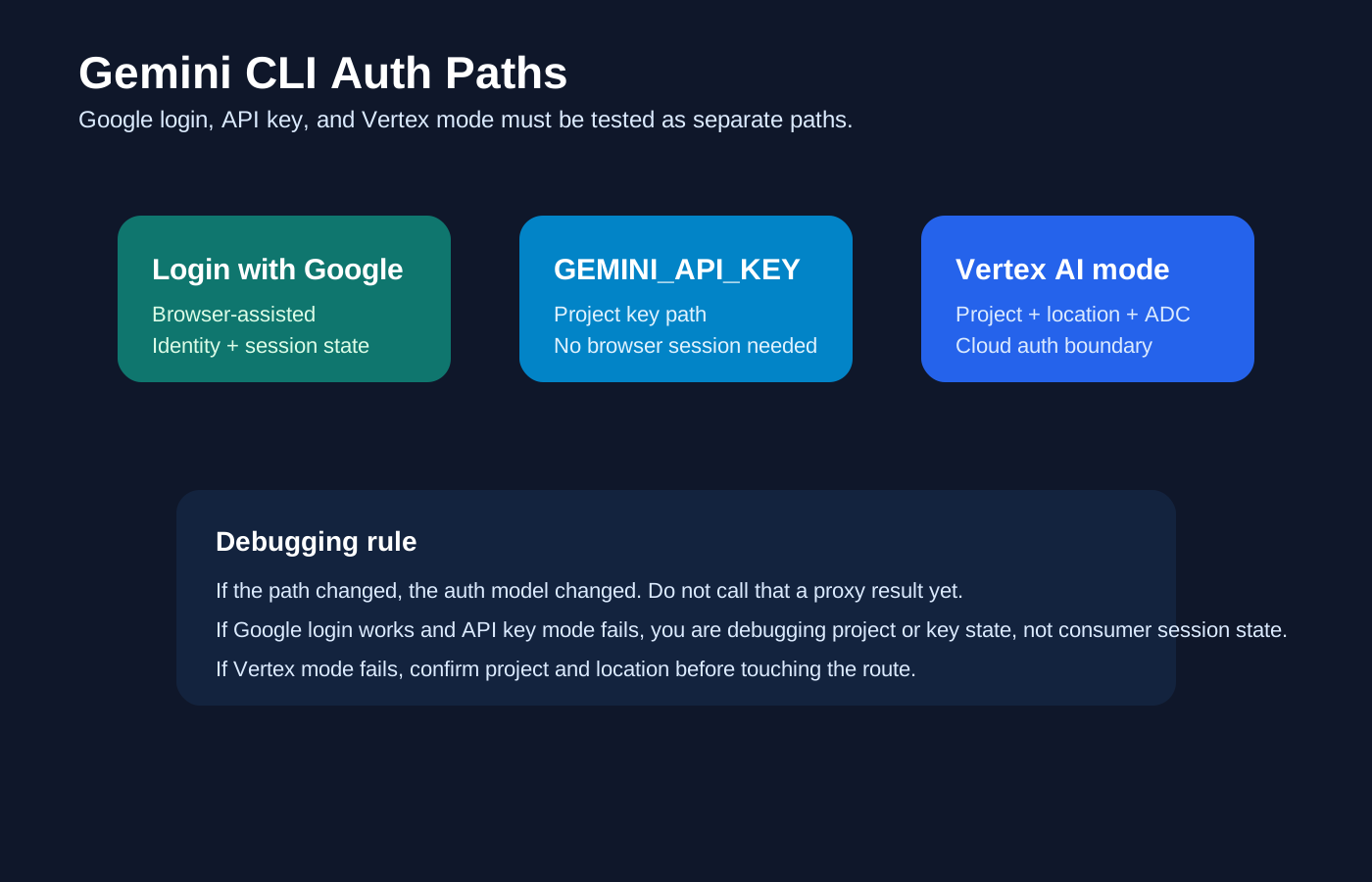
Gemini CLI supports Google login, GEMINI_API_KEY, or Vertex AI authentication with project and location variables.
My working read on this surface
Gemini CLI has a distinct information gap because the product deliberately offers three auth paths: Login with Google, Gemini API key, and Vertex AI. Many low-quality guides write about them as if they were just variants of one login.
What usually changes the result before the proxy does
The common mistake is assuming Gemini CLI auth is only about region or IP. In practice the bigger split is Google login vs API key vs Vertex project context.
What breaks in practice first
- The operator thinks they are testing a Google-login path, but the CLI is actually using a cached API key or Vertex environment variables.
- A Google account session and a project-scoped Vertex path get mixed into one debugging run, producing fake network conclusions.
- The team rotates routes aggressively when the actual problem is missing project selection, unsupported free usage context, or headless auth setup.
What I use the route to observe
- keep long-lived local coding sessions on a stable route
- separate workspaces or upstream accounts during CLI QA and debugging
- test gateway or account-backed flows without leaking sessions across tools
What I will not promise from a proxy
- They cannot replace the tool's required login, key, or subscription entitlement.
- They cannot guarantee every CLI will tolerate aggressive IP rotation or shared sessions.
- They cannot hide a broken local credential cache, wrong project setting, or expired token.
My observation vs claim-to-avoid matrix
| Scenario | Proxy type I prefer | What I am actually observing | Claim I avoid |
|---|---|---|---|
| Gemini CLI direct login path | Sticky residential or ISP | Whether the auth flow works cleanly with one stable workspace and one stable egress path | That a proxy replaces the required login or entitlement |
| Long-lived coding session | Sticky residential | Whether the session drifts or survives long edits and tool calls | That fast rotation is better for coding tools |
| Gateway-backed CLI path | Stable datacenter or sticky residential | Whether the relay changes attribution, limits, or auth behavior | That the route is the only moving part |
| Country-specific console or dashboard QA | Country-specific residential | Whether the related account or console surface changes by market | That market observation proves long-term access |
When I would use a proxy here
- You need one long-lived route for browser-assisted auth or account-backed coding sessions.
- You need to separate one workspace or upstream account from another in a repeatable way.
When I would not buy one yet
- Direct mode is still untested, so you cannot tell whether the route is even part of the problem.
My practical QA workflow
- Start with one clean workspace and write down whether the auth path is browser-assisted login, API key, or gateway token.
- Verify the CLI works in direct mode before inserting a relay or route change.
- Move to one sticky route per workspace once you need session stability or account separation.
- Only then compare gateway, rotation, or regional variants so the auth residue from one run does not poison the next.
Provider shortlist I would start with
| Provider | Best fit for this page | Why I would start here |
|---|---|---|
| Bright Data | Best when Gemini CLI work touches browser-assisted login, sticky long-running coding sessions, or account-backed routing that should not drift mid-session. | Best overall for production AI workflows, geo QA, and public-web access layers. |
| Proxy-Seller | Useful when Gemini CLI is mostly about stable terminal egress and upstream account separation, not browser automation. | Strong self-serve option for dedicated or sticky session control at a lower cost. |
| IPRoyal | Useful for narrower Gemini CLI sessions or one-workspace-per-route setups where the operator wants cheaper stickiness. | Good budget pick for smaller sticky residential or ISP-style session workflows. |
| Webshare | Useful when Gemini CLI is still in the experimentation phase and the team wants cheap account separation before buying heavier infrastructure. | Simple lower-friction option for smaller teams testing account separation and gateway routing. |
What I log before I change anything
- Workspace path
- Auth mode
- Route type and stickiness
- Gateway or upstream provider used
Related AI proxy pages
- AI Proxies
- Best AI Proxy Providers for 2026
- Best ChatGPT Proxies for 2026
- Best Claude Proxies for 2026
- Best Gemini Proxies for 2026
- Google AI Studio Proxies for 2026
- Vertex AI Proxies for 2026
FAQ
Do I actually need a proxy for Gemini CLI?
Only when you need network separation, country-specific QA, gateway routing, or a more stable browser or CLI session than your default path provides.
Which proxy type is the safest default for Gemini CLI?
For account or CLI sessions, sticky ISP or static residential is usually the safest default. For broader country QA, rotating residential is more flexible.
What cannot be fixed by a proxy on Gemini CLI?
Expired credentials, unsupported countries, missing entitlements, bad project settings, and broken gateway logic are all outside the proxy's control.
Sources checked
- https://google-gemini.github.io/gemini-cli/docs/get-started/authentication.html
- https://google-gemini.github.io/gemini-cli/
- https://ai.google.dev/gemini-api/docs/api-key
- https://cloud.google.com/vertex-ai/generative-ai/docs/start
- https://brightdata.com/proxy-types
Final verdict
I use proxies on Gemini CLI once the underlying surface is clear and the observation goal is narrow. The route can help me isolate state, compare markets, and keep QA repeatable, but it is not a substitute for real entitlements, clean auth, or correct project setup.